It's very simple to verify this. Have a simple 'php info' script.
Create a file named 'phpinfo.php' under the public_html of your domain
Insert the following code:
phpinfo();
?>
Access the file in your browser using the link http://yourdomain.com/phpinfo.php
At the top section search the line 'Server API'.
If you see CGI' then your account is hosted on a server with suPHP.
If it shows 'apache' then you are NOT on a suPHP server.
Create a file named 'phpinfo.php' under the public_html of your domain
Insert the following code:
phpinfo();
?>
Access the file in your browser using the link http://yourdomain.com/phpinfo.php
At the top section search the line 'Server API'.
If you see CGI' then your account is hosted on a server with suPHP.
If it shows 'apache' then you are NOT on a suPHP server.


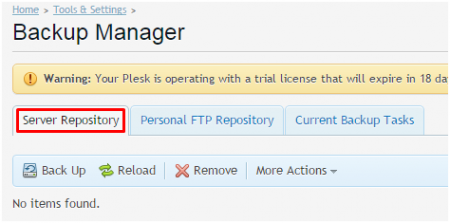
 4. On the Backup Manager Page, select where you would like to store your backup by selecting the relevant tab. Server Repository - This will back up to the server that Plesk is currently running on.Personal FTP Repository - This option will store the backup to any FTP space you have the credentials for. In this example, we are going to select Server Repository to backup the data